
Zenella
AMD Zen 5 Microcode Update Reversing — Binary Ninja Plugin
Binary Ninja
Python
GPL v3
AMD Zen 5
AMD Zen 5 Microcode Update Reversing — Binary Ninja Plugin
Zenella is a lightweight Binary Ninja plugin that applies a known data-structure layout
to AMD Zen 5 microcode .bin blobs (typically 0x3820 bytes).
It turns raw binary noise into a navigable, annotated structure — without attempting to
disassemble microcode.
Defines 10 typed structures covering the full 0x3820-byte patch layout — header, crypto blocks, options, match/mask registers, and the µcode region.
Binary Ninja's Linear view becomes immediately navigable. Header fields are parsed, random blocks labeled, and µcode is represented as an array of 4-byte micro-ops.
One command to define types, one to apply at offset 0, and one to apply wherever your cursor sits — ideal for blobs embedded inside larger firmware images.
Ships multiple fallback code-paths for enum and structure construction, so it works across older and newer Binary Ninja Python API variants without modification.
Every AMD Zen 5 microcode blob is exactly 0x3820 bytes. Zenella maps
the following regions:
| Symbol | Offset | Size | Type | Description |
|---|---|---|---|---|
amd_mc_header |
0x0000 |
0x20 | AMD_MC_Header |
Date, revision, loader ID, checksum, CPUID flags |
amd_mc_signature |
0x0020 |
0x100 | u8[256] |
RSA-style signature block |
amd_mc_modulus |
0x0120 |
0x100 | u8[256] |
Public-key modulus block |
amd_mc_check |
0x0220 |
0x100 | u8[256] |
Check block (possibly Montgomery-related constant) |
amd_mc_options |
0x0320 |
0x04 | AMD_MC_UcodeOptions |
autorun, encrypted, loader ID copy |
amd_mc_rev |
0x0324 |
0x04 | u32 |
Revision copy (extended header) |
amd_mc_match_regs |
0x0328 |
0x28 | AMD_MC_MatchRegisterBlock |
10 × u32 match registers |
amd_mc_mask_regs |
0x0350 |
0x30 | AMD_MC_MaskRegisterBlock |
12 × u32 mask registers |
amd_ucode_region |
0x0380 |
0x34A0 | AMD_Zen_MicrocodeRegion |
3368 × 4-byte micro-ops (opcode, b1, imm16) |
After installation the plugin registers three commands under AMD Microcode in the Binary Ninja Plugins menu:
Registers all AMD microcode structs and enumerations in the current database — without applying anything to the binary view. Useful for inspecting the type library before committing to a layout pass.
Defines types (if not already defined) and then applies the full 9-region
layout starting at offset 0x0000. This is the go-to command for
standalone microcode .bin files.
Same as above, but uses the current cursor address as the blob base. Essential when the microcode is embedded inside a larger firmware image at a non-zero offset.
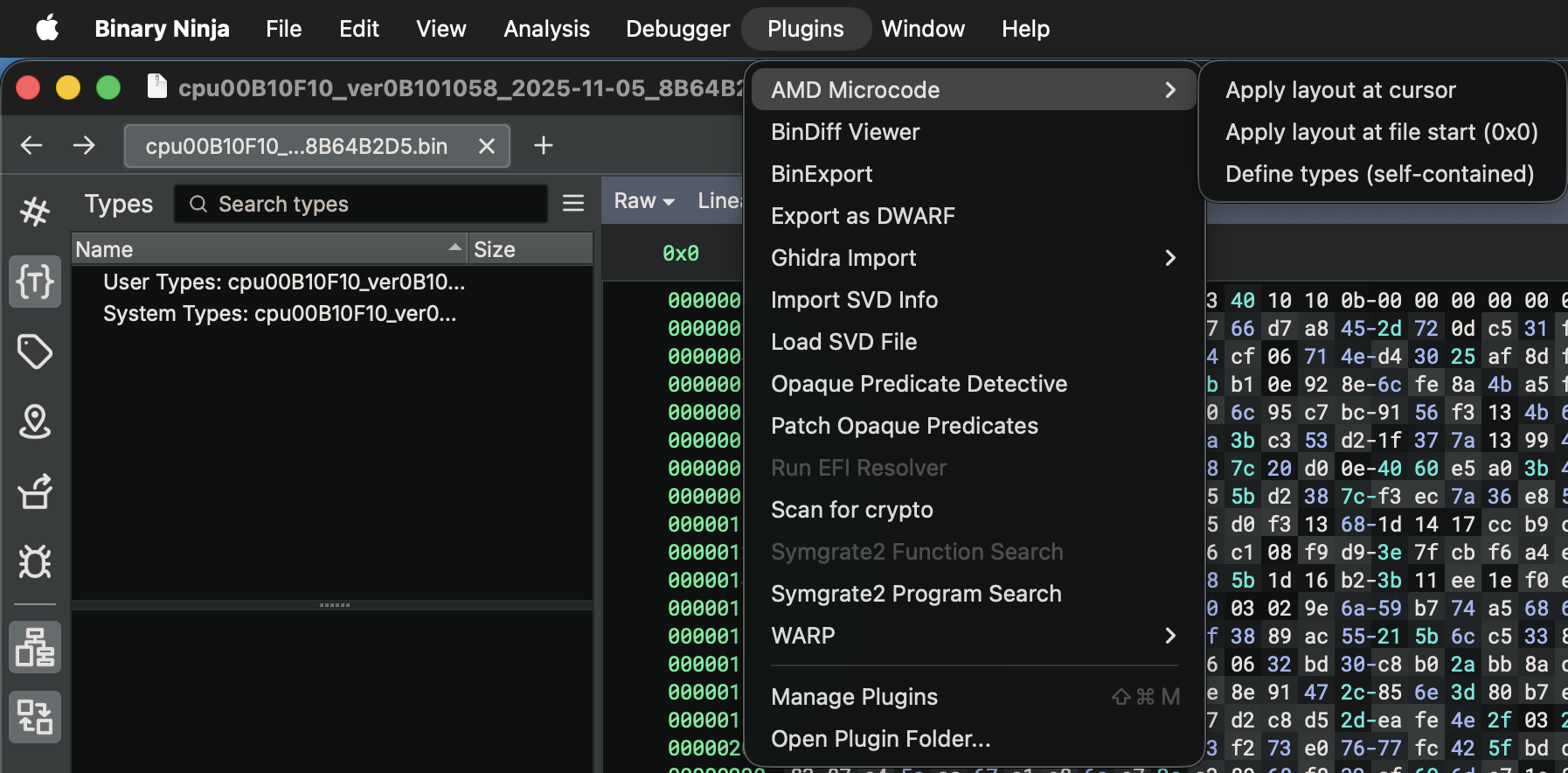
Plugin commands as they appear in Binary Ninja's Plugins menu
Zenella creates the following types in the Binary Ninja database. All structures are packed (no implicit padding).
AMD_MC_Header 0x20 bytesu16 | year |
u8 | day |
u8 | month |
u32 | update_revision |
AMD_MC_LoaderIdTag | loader_id |
u8 | data_size |
u8 | init_flag |
u32 | data_checksum |
u16 | nb_ven |
u16 | nb_dev |
u16 | sb_ven |
u16 | sb_dev |
AMD_MC_CpuId | proc_sig |
u8 | bios_revision |
u8 | flags |
u8[2] | reserved, reserved2 |
AMD_Zen_MicroOp 4 bytesAMD_Zen_Opcode | opcode |
u8 | b1 |
u16 | imm16 |
| Class-dependent / non-RegOp | |
|---|---|
0x00 | AMD_ZEN_UOP_LD_ST_00 |
0x05 | AMD_ZEN_BR_JMP |
| RegOp / RegX | |
0x19 | AMD_ZEN_REG_NSUB |
0x30 | AMD_ZEN_REG_AND |
0x40 | AMD_ZEN_REG_SHL |
0x41 | AMD_ZEN_REG_BLL |
0x42 | AMD_ZEN_REG_ROL |
0x44 | AMD_ZEN_REG_RLC |
0x46 | AMD_ZEN_REG_RRD |
0x47 | AMD_ZEN_REG_SRC |
0x48 | AMD_ZEN_REG_SHR |
0x4A | AMD_ZEN_REG_ROR |
0x4C | AMD_ZEN_REG_RRC |
0x4F | AMD_ZEN_REG_SRD |
0x50 | AMD_ZEN_REG_SUB |
0x52 | AMD_ZEN_REG_SBB |
0x55 | AMD_ZEN_REG_NADD |
0x5C | AMD_ZEN_REG_ADD2 |
0x5D | AMD_ZEN_REG_ADC |
0x5E | AMD_ZEN_REG_ADD3 |
0x5F | AMD_ZEN_REG_ADD |
0x6F | AMD_ZEN_REG_VZEROUPPER_64B |
0x70 | AMD_ZEN_REG_POPCNT |
0x72 | AMD_ZEN_REG_SBIT |
0x7F | AMD_ZEN_REG_VZEROUPPER_32B |
0x93 | AMD_ZEN_REG_MOV2 |
0xA0 | AMD_ZEN_REG_MOV_SREG |
0xA9 | AMD_ZEN_REG_BSWAP |
0xB5 | AMD_ZEN_REG_XOR |
0xBE | AMD_ZEN_REG_OR |
0x47 | AMD_ZEN_REG_SRC_CF_CANDIDATE |
| SpecOp | |
0xFF | AMD_ZEN_SPEC_NOP |
| Misc | |
0xDE | AMD_ZEN_TYPE5_READ |
AMD_MC_UcodeOptions 4 bytesu8 | autorun |
u8 | encrypted |
u16 | loaderid |
0x8004 | AMD_MC_LOADER_8004 |
0x8005 | AMD_MC_LOADER_8005 |
0x8010 | AMD_MC_LOADER_8010 |
0x8015 | AMD_MC_LOADER_8015 |
0x8016 | AMD_MC_LOADER_8016 |
AMD_MC_MatchRegisterBlock 40 bytesu32[10] | match_reg |
AMD_MC_MaskRegisterBlock 48 bytesu32[12] | mask_reg |
AMD_MC_CpuId 4 bytesu32 | proc_sig |
AMD_MC_Patch 0x3820 bytes — top-level containerAMD_MC_Header | header |
u8[256] | signature |
u8[256] | modulus |
u8[256] | check |
AMD_MC_UcodeOptions | options |
u32 | rev |
AMD_MC_MatchRegisterBlock | match_regs |
AMD_MC_MaskRegisterBlock | mask_regs |
AMD_Zen_MicrocodeRegion | microcode — 3368 × AMD_Zen_MicroOp |
In Binary Ninja go to Plugins → Open Plugin Folder…
~/Library/Application Support/Binary Ninja/plugins/   # macOS
%APPDATA%\Binary Ninja\plugins\                       # Windows
~/.binaryninja/plugins/                               # Linux
Place amd_zen_ucode.py into the plugins directory.
cp amd_zen_ucode.py ~/Library/Application\ Support/Binary\ Ninja/plugins/
After restarting you will see the AMD Microcode submenu appear in Plugins. No additional dependencies are required — the plugin uses only the Binary Ninja Python API that ships with the desktop application.
Drop the AMD microcode .bin file into Binary Ninja. Use
Raw or PE binary view depending on your source.
Go to Plugins → AMD Microcode → Apply layout at file start (0x0). For embedded blobs, navigate to the blob header first then use Apply layout at cursor.
Switch to Linear view. All regions are now labeled. Click any
field in amd_mc_header to inspect date, revision, loader ID, and
checksum immediately.
Jump to amd_ucode_region. Each 4-byte entry is typed as
AMD_Zen_MicroOp — opcode, operand byte, and 16-bit immediate
are broken out. Known opcodes are resolved to enum names.
Live demo — applying the layout to a Zen 5 microcode blob